
Difficulty: Medium Time: 60–120 minutes Tools Required: None Skill Level: Intermediate
A DIY Retro Gaming System is a fun, customizable retro gaming console built using a Raspberry Pi and RetroPie. This project is perfect for makers who enjoy building things themselves and want a clean, legal retro gaming setup using open‑source and freeware games.

Quick Verdict
If you enjoy DIY Retro Gaming System tinkering, customizing hardware, and building something yourself, a DIY Retro Gaming System using RetroPie is a fun and rewarding project. You get full control over the setup and a clean, legal retro experience using open‑source games.
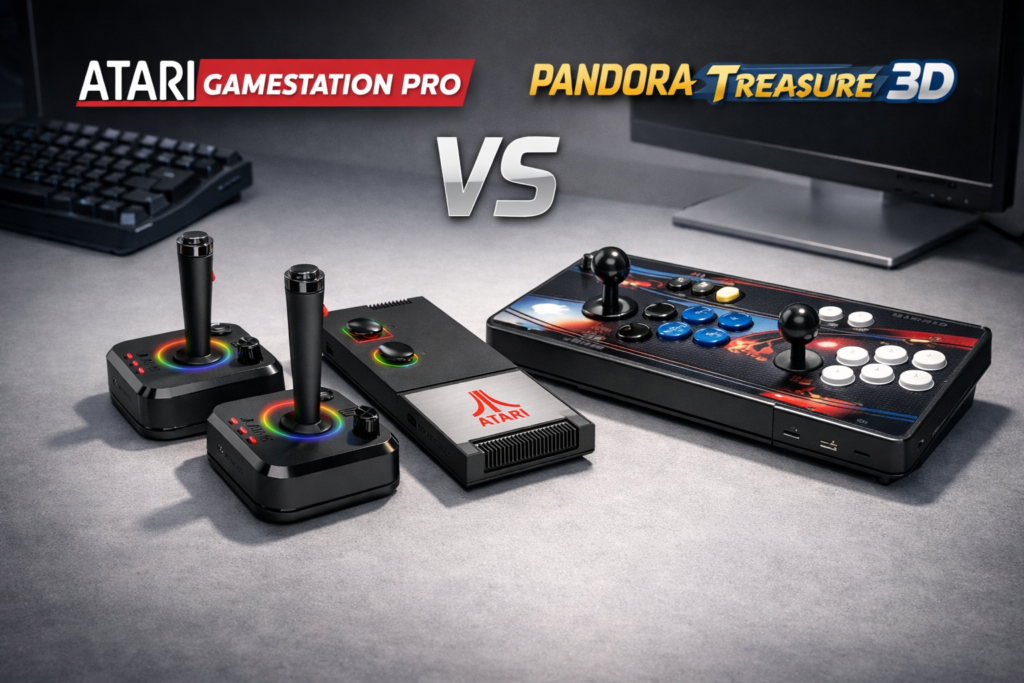
But if your goal is simply to play retro games at the best price, the DIY route isn’t the most cost‑effective. A Raspberry Pi build typically costs $160–$200, while pre‑built retro consoles like the Atari GameStation Pro or Pandora Treasure 3D cost $99–$129 and include hundreds to thousands of games right out of the box.
DIY is for the experience. Pre‑built is for convenience and value.
Table of Contents
What You’re Building
A compact retro gaming console that:
- Boots directly into RetroPie
- Plays open‑source and freeware games legally
- Uses your own controllers
- Runs on a microSD card
- Looks great on your desk or entertainment setup
- Can be customized with themes, boot logos, and hardware mods
This project focuses on legal, open‑source retro gaming using RetroPie’s built‑in Ports.
Parts List
| Component | Purpose |
|---|---|
| Raspberry Pi 4 (4GB or 8GB) | Main system |
| 128GB microSD card | OS + storage |
| Case + heatsinks | Cooling + protection |
| 5V 3A power supply | Stable power |
| USB or Bluetooth controllers | Input |
| HDMI cable | Display output |


Tools Needed
- Small screwdriver (if your case requires assembly)
- Raspberry Pi Imager
- Computer with SD card reader
- Internet connection
Official Downloads
RetroPie
- Download: https://retropie.org.uk/download/
- Documentation: https://retropie.org.uk/docs/
Raspberry Pi Tools
- Raspberry Pi Imager: https://www.raspberrypi.com/software/
- Hardware info: https://www.raspberrypi.com/products/
Where to Get Games (Legal & Built‑In)
RetroPie includes several open‑source and freeware games that you can install directly from the RetroPie Setup → Manage Optional Packages → Ports menu.
These games run natively on the Raspberry Pi and require no external downloads.
Included RetroPie Ports
- Doom (shareware)
- Quake (shareware)
- OpenTyrian
- Cave Story
- Duke Nukem 3D (shareware)
- Wolfenstein 3D (shareware)
- Commander Keen (open‑source engine)
- Descent (open‑source engine)
- Aleph One (Marathon engine)
- Stratagus (RTS engine)
Step‑by‑Step Build Guide
1. Flash RetroPie
Use Raspberry Pi Imager to write RetroPie to your microSD card.
2. Assemble Your Pi
Install the case, heatsinks, and insert the microSD card.
3. First Boot
Connect HDMI → power on → RetroPie loads.
4. Configure Controller
RetroPie will prompt you to map your buttons.
5. Install Games
Go to: RetroPie Setup → Manage Packages → Manage Optional Packages → Ports
Install any open‑source game you want.
6. Customize
Add Wi‑Fi or Bluetooth
Install themes
Add a boot splash screen
Adjust controller layouts
Tips & Notes
- Ethernet gives faster initial setup than Wi‑Fi
- A Pi 4 runs cooler with a small fan
- RetroPie themes dramatically improve the look
- You can add a USB stick for extra storage
- Keep everything legal by using only open‑source Ports
Cost Analysis
Building your own retro gaming system is fun — but not always the cheapest option.
DIY Retro Gaming System Cost
| Component | Cost |
|---|---|
| Raspberry Pi 4 | $60–$80 |
| microSD card | $10–$15 |
| Case + cooling | $10–$20 |
| Power supply | $10–$15 |
| Controllers | $20–$40 |
| HDMI cable | $8–$12 |
| Misc accessories | $10–$20 |
Total DIY Cost: $160–$200
This gives you a legal, customizable, maker‑friendly retro system — but only includes open‑source games.
Pre‑Built Retro Consoles (Better Value)
If you just want to play games, these options offer more value:
Atari GameStation Pro
- Price: ~$99
- Games: 200+ official Atari titles
- Comparison: https://loadoutworkshop.com/atari-gamestation-pro-vs-pandora-treasure-3d-retro-console-comparison/
Pandora Treasure 3D
- Price: ~$129
- Games: 1000+ arcade titles
- Comparison: same link above
Final Recommendation
If you love building things, customizing hardware, and learning new skills, the DIY Retro Gaming System is a fantastic project. It’s fun, hands‑on, and gives you full control over your setup.
But if you want the best value, more games, and plug‑and‑play simplicity, the Atari GameStation Pro or Pandora Treasure 3D are better choices.
DIY is for the experience. Pre‑built is for convenience.